monostr / Watcher
Run a personal watcher
A watcher confirms your Monero tips on Nostr. With a personal watcher, your private view key stays on your own machine: no node to sync, no domain, no open port.
What it does
When someone tips you in monostr, their wallet pays your address directly. A watcher needs your private view key to see that the payment arrived; it then publishes a signed receipt on Nostr, and the tip shows under the note. The view key can only see incoming payments, never spend them.
The default watcher, watcher.monostr.com, does this for anyone. A personal watcher does it only for you, on a machine you control. Nobody else sees your view key or your incoming payments.
It scans through public Monero nodes, so there is no blockchain to download, and it only connects outward. It works behind a home router.
What you need
- A small machine that is always on: a Raspberry Pi 4 or 5, a NAS that runs Docker, or any VPS
- Docker with the Compose plugin, and Git
- About 1 GB of disk and 1.5 GB of RAM
- monostr 0.17 or newer on your phone
- A Monero wallet only for tips (next step)
1. A wallet for tips
The view key shows the watcher every incoming payment of the wallet, not only tips. Create a new wallet just for tips, in Cake Wallet, Monerujo, monfluo or any other Monero wallet.
You need two values from it:
- the primary address, which starts with
4(not a subaddress starting with8) - the private view key, 64 hex characters
Where the wallet shows them:
- Cake Wallet: Settings → Recovery & Keys
- Monerujo: in the wallet, Settings → Show Secrets!
- monfluo: tap the wallet name, then Display wallet secrets
Never use the spend key or the seed; the watcher does not need them.
2. Install
On the machine, in a terminal:
git clone https://github.com/schmidt1024/monostr.git
cd monostr/watcher
cp .env.personal.example .env
chmod 600 .env
sed -i "s/^WATCHER_SECRET_KEY=.*/WATCHER_SECRET_KEY=$(openssl rand -hex 32)/" .env
The last line creates the watcher's own Nostr key. It signs the receipts; you never need it in the app.
Open .env in an editor (for example nano .env) and fill in:
WATCHER_RECIPIENT- your npub, the account that receives the tips
WATCHER_ADDRESS- the primary address of the tip wallet
WATCHER_VIEW_KEY- its private view key
The rest can stay as it is. WATCHER_RELAYS lists the relays where senders post their tips and the watcher posts the receipts; the default works.
3. Start
docker compose -f compose.personal.yml up -d --build
docker compose -f compose.personal.yml logs watcher | grep nprofile
The first start builds the watcher and takes a few minutes. The log line contains the watcher's address on Nostr, a long value that starts with nprofile1. Copy it.
4. Connect the app
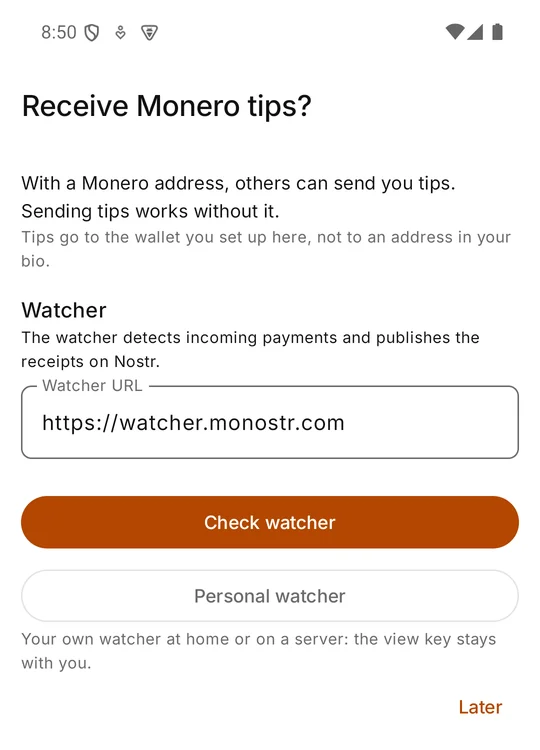
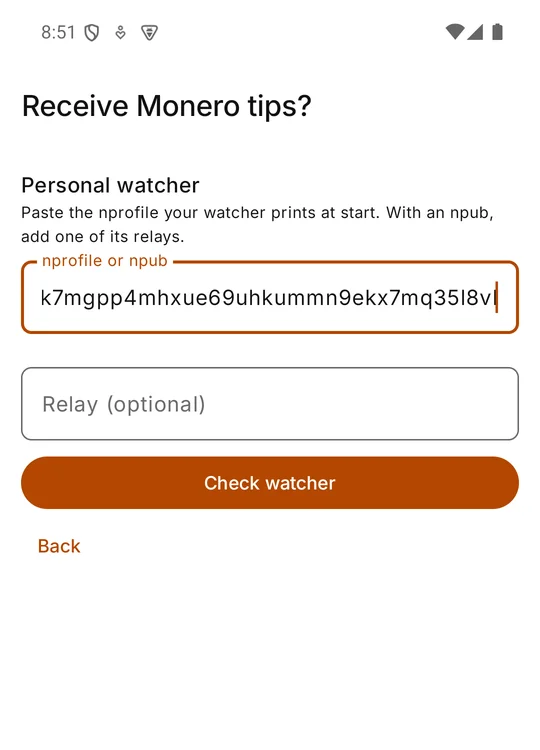
In monostr: Settings → Monero tips → Switch watcher → Personal watcher. If you have not set up tips yet, the entry is Set up receiving Monero tips.
Paste the nprofile1… and tap Check watcher. The app checks that the watcher is online and set up for your account, and shows the address it watches. Compare it with your tip wallet, then tap Use this watcher. The app announces the watcher in your profile, so senders post their tips to it.
5. Check that it runs
Under Settings → Monero tips the app shows Personal watcher … · online. The watcher publishes a status every five minutes; if none arrived for 15 minutes, the app shows it as offline.
On the machine, the log shows what the watcher is doing:
docker compose -f compose.personal.yml logs -f watcherHow it stays honest: the watcher runs two copies of your view-only wallet, each syncing through a different public node. A tip counts only when both see the payment with the same amount, so a single lying node cannot invent tips. A node could still hide a payment; the money then arrives in your wallet anyway, only without a receipt.
Good to know
Hide your IP address (Tor)
In .env, remove the # in front of the two lines under Tor (optional), then start again:
docker compose -f compose.personal.yml up -dRelays and nodes then no longer see the machine's IP address.
When the machine is off
Tips still arrive in your wallet; the receipts follow when the watcher is back: it reads the tips it missed from the relays. Keep the outage short, though; a relay that deletes old events after some time takes the missed tips with it, and those never get a receipt.
Updates
cd monostr && git pull
cd watcher && docker compose -f compose.personal.yml up -d --build
Backup
Back up .env: it holds the watcher's key. With the same key a new machine continues as the same watcher, and the app needs no change.
Back to the default watcher
Settings → Monero tips → Switch watcher, keep https://watcher.monostr.com as the watcher URL and register your tip wallet there. Then stop the personal watcher:
docker compose -f compose.personal.yml downMore
Want to host a watcher for others, with your own Monero node and domain? See Host a watcher. The technical reference is SELFHOST.md in the repository. Questions or problems: open an issue or mention monostr on Nostr.